
It’s important to understand the Applications Life Cycle and ViewController life Cycle before starting to develop iOS Apps.
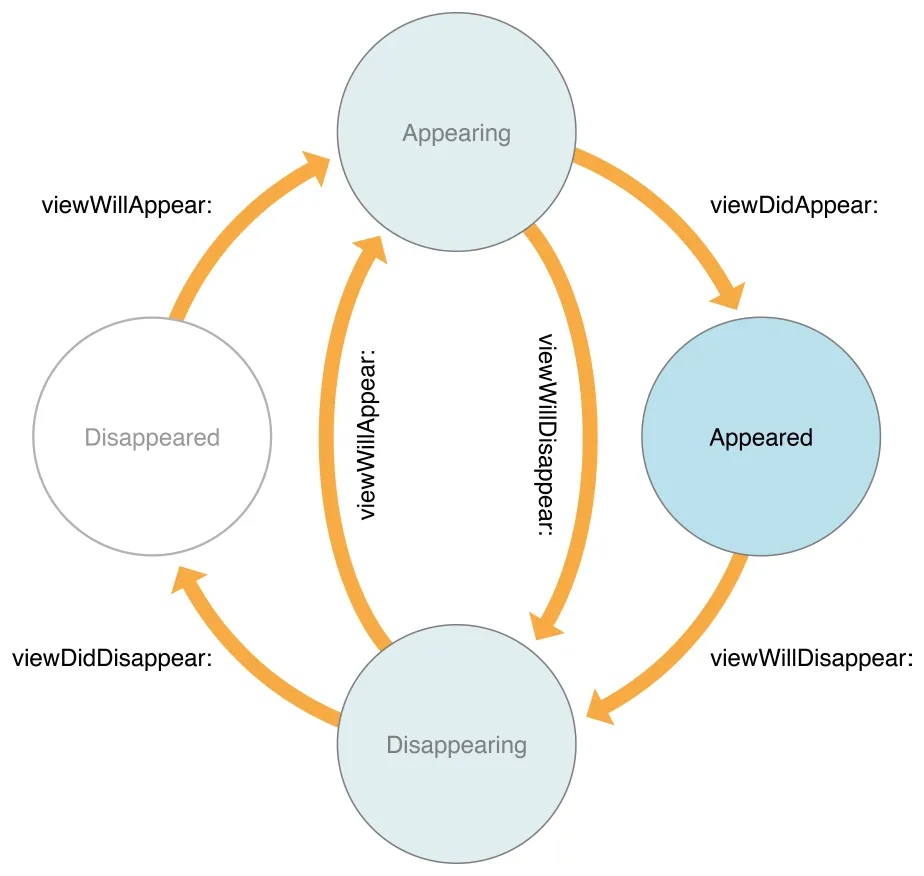
First, let’s figure out which order works ViewController and after that dive deeper into each function.
- init()
- loadView()
- viewDidLoad()
- viewWillAppear()
- viewIsAppearing()
- viewWillLayoutSubviews()
- viewDidLayoutSubviews()
- viewDidAppear()
- viewWillTransition()
- viewWillDisappear()
- viewDidDisappear()
- deinit()
As you see in the above functions when we create UIViewController we go through many functions.
# init()init(): This is the designated initializer for UIViewController. It's called when the view controller is being initialized. You typically override this method to perform custom initialization for your view controller. It's important to call the superclass's designated initializer (super.init(nibName:bundle:)) within your custom init() implementation.
# loadView()loadView(): This method is responsible for creating or loading the view hierarchy of the view controller. You override this method when you want to create your view hierarchy programmatically without using a storyboard or a nib file. If you don't override this method, the view controller will automatically load its view from a nib or storyboard. If you want to perform any additional initialization of your views, do so in the viewDidLoad() method. You should never call this method directly. The view controller calls this method when its view property is requested but is currently nil. This method loads or creates a view and assigns it to the view property.
# viewDidLoad()viewDidLoad(): This method is called after the view controller has loaded its view hierarchy into memory. This method is called regardless of whether the view hierarchy was loaded from a nib file or created programmatically in the loadView() method. You usually override this method to perform additional initialization on views that were loaded from nib files. It’s a good place to perform one-time setup tasks for your view controller, such as initializing data, setting up UI elements, or loading data from external sources. This method is called only once during the view controller’s lifecycle.
# viewWillAppear()viewDidLoad(): This method is called before the view controller’s view is about to be added to a view hierarchy and before any animations are configured for showing the view. You can override this method to perform custom tasks associated with displaying the view. It’s often used to perform tasks that need to happen every time the view is shown, such as updating UI elements or refreshing data. If you override this method, you must call super at some point in your implementation.
# viewIsAppearing()viewIsAppearing(): The system calls this method once each time a view controller’s view appears after the viewWillAppear(_:) call. In contrast to viewWillAppear(_:), the system calls this method after it adds the view controller’s view to the view hierarchy, and the superview lays out the view controller’s view. By the time the system calls this method, both the view controller and its view have received updated trait collections and the view has accurate geometry.
You can override this method to perform custom tasks associated with displaying the view. For example, you might use this method to configure or update views based on the trait collections of the view or view controller. Or, because computing a scroll position relies on the view’s size and geometry, you might programmatically scroll a collection or table view to ensure a selected cell is visible when the view appears.
If you override this method, you need to call super at some point in your implementation. You can see the below image and figure out where it is called and so on.

# viewWillLayoutSubviews()viewWillLayoutSubviews(): This method is called just before the view controller's view is about to update its layout to fit the current device's orientation or size. You can override this method to make adjustments to your view's layout before it occurs. For example, you can override this method to fix issues when the user changes orientation to landscape and gets back because often occurs issues when the users change application orientation.
# viewDidLayoutSubViews()viewDidLayoutSubviews(): This method is called after the view controller's view has finished updating its layout. You can use this method to perform additional layout-related tasks or animations that depend on the final layout of your view.
# viewDidAppear()viewDidAppear(): This method is called when the view has appeared on the screen. It's often used to start animations, load additional data, or perform other tasks that should happen after the view is fully visible.
# viewWillDisappear()viewWillDisappear(): This method is called just before the view is about to disappear from the screen, typically when you navigate away from the current view controller. It's often used to perform cleanup tasks, save data, or pause ongoing processes that are specific to the current view. For example, you might stop media playback or invalidate timers when the view is about to disappear.
# viewDidDisappear()viewDidDisappear(): This method is called after the view has disappeared from the screen. It's often used to perform additional cleanup tasks or to release resources that were allocated when the view was visible. For example, you might release memory-intensive resources, unregister from notifications, or stop observing changes.
# viewWillTransition()viewWillTransition(): This method is called when the view controller’s trait collection is changed by its parent. UIKit calls this method before changing the size of a presented view controller’s view. You can override this method in your own objects and use it to perform additional tasks related to the size change. For example, a container view controller might use this method to override the traits of its embedded child view controllers. Use the provided coordinator object to animate any changes you make.
If you override this method, you should either call super to propagate the change to children or manually forward the change to children.
# deinit()deinit(): This method is automatically called when an instance of a class is being deallocated or destroyed. It's the counterpart to the init() method, which is called when an instance is being initialized. You can use the deinit() method to perform cleanup tasks, release resources, or unregister from observers when the object is no longer needed.
For view controllers, deinit() can be useful for cleaning up any resources that were allocated during the view controller's lifecycle but are no longer needed. For example, you might use deinit() to release memory, close network connections, or perform any other necessary cleanup before the view controller is removed from memory.
As you see we together covered ViewController life cycle and life cycle methods. Also, I want to share with you a code example you can copy-paste and check the ViewController life cycle how it works, and so on.
final class ViewController: UIViewController {

    deinit {
        print("deinit")
    }

    override func didReceiveMemoryWarning() {
        super.didReceiveMemoryWarning()
        print("didReceiveMemoryWarning")
    }

    override func viewWillTransition(to size: CGSize, with coordinator: UIViewControllerTransitionCoordinator) {
        super.viewWillTransition(to: size, with: coordinator)
        print("viewWillTransition")
    }

    override func viewIsAppearing(_ animated: Bool) {
        super.viewIsAppearing(animated)
        print("viewIsAppearing")
    }

    override func viewDidLayoutSubviews() {
        super.viewDidLayoutSubviews()
        print("viewDidLayoutSubviews")
    }

    override func viewWillLayoutSubviews() {
        super.viewWillLayoutSubviews()
        print("viewWillLayoutSubviews")
    }

    override func viewDidDisappear(_ animated: Bool) {
        super.viewDidDisappear(animated)
        print("viewDidDisappear")
    }

    override func viewWillDisappear(_ animated: Bool) {
        super.viewWillDisappear(animated)
        print("viewWillDisappear")
    }

    override func viewDidAppear(_ animated: Bool) {
        super.viewDidAppear(animated)
        print("viewDidAppear")
    }

    override func viewWillAppear(_ animated: Bool) {
        super.viewWillAppear(animated)
        print("viewWillAppear")
    }

    override func loadView() {
        super.loadView()
        print("loadView")
    }

    override func viewDidLoad() {
        super.viewDidLoad()
        print("viewDidLoad")
    }
}
No comments:
Post a Comment